
SULIFLOW / TASK CALENDAR
Consistent tasks. Fewer misunderstandings.
I built Task calendar to give the tasks at my workplace a shared structure. A name, phone number and task type become a calendar task with standardised text.
Development is ongoing
Web-based. Built for the office computer, and the layout also adapts to smaller screens.
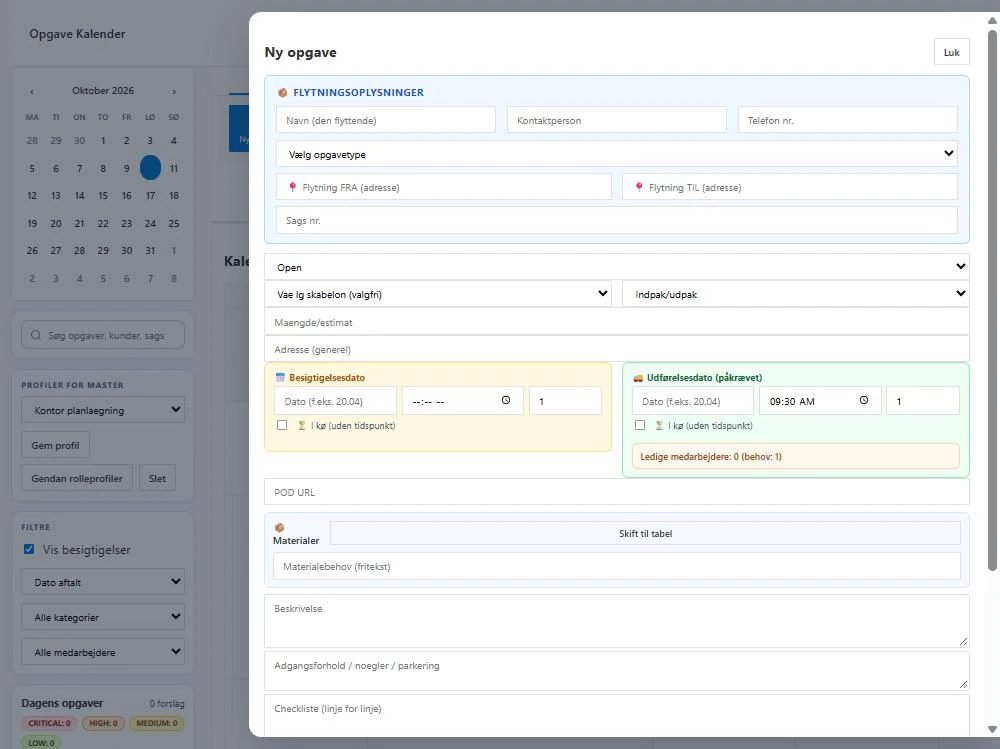 View larger screenshot
It started with different ways of writing.
A calendar task needs to make sense to the next colleague who reads it.
At work, we use Outlook for our calendar. Colleagues described tasks in different ways, which could lead to misunderstandings about what needed to happen.
I wanted to make creating tasks simpler and their content more consistent. That is why I built an app that brings the key information together in a shared format, instead of each colleague starting with a blank text field.
From a few details to a clear task.
The task type determines the standard text, so the colleague can focus on the specific details.
- 01
Name and phone number
Enter the name and phone number so the contact details are included with the task.
- 02
Choose the task type
Choose the type of task to be carried out. The app uses that choice to generate the standard text.
- 03
The task is created in the calendar
The information is brought together in a consistent calendar task that is easier for colleagues to read and understand.
What the app can do today.
A shared format
- The name, phone number and task type provide the basis for a task with standardised text.
Tasks together in the calendar
- The calendar view provides an overview of tasks and a shared starting point for planning the day.
Completed and invoiced
- When a case has been completed and invoiced, the task can be marked with a colour category. A colleague applies the marker so the status is visible in the calendar.
I am continuing to connect the work.
Task calendar is still in development. The next steps are about connecting the task to the case, the colleague and the work in other towns.
Planned
Connection to case management
The plan is to connect the calendar task to case management so the information can follow the case through the work ahead.
Planned
Assigning tasks to colleagues
The plan is to use shared user accounts so a task can be assigned to the colleague who will carry it out.
Planned
An overview across towns
The plan is also to show relevant tasks in other towns so work can be coordinated between locations.
An idea or a question?
Do you have questions about the systems or the story behind Sulitech? You are welcome to get in touch.